Styling cards
Cards are styled by adding the following to the card configuration:
uix:
  style: <styles>
In the simplest form, <styles> is a string of CSS which will be injected into the appropriate element based on the card type. See Concepts - application for a detailed description on where UI eXtension is applied.
Note
UI eXtension only works on cards that are contained by a <hui-card> element, or contain a <ha-card> element. This includes almost every standard Home Assistant Frontend card, and most custom cards.
For a card contained by a <hui-card> element, which is almost every standard Home Assistant Frontend card, styles are injected into a shadowRoot and the bottom most element is :host, though in most cases the first element in the shadowRoot is <ha-card>. For many custom cards which do not take advantage of the modern <hui-root> container, but contain a <ha-card> element, the styles are injected into ha-card and the bottommost element is <ha-card>. See Concepts - application for more details.
Tip
Home Assistant themes make use of CSS variables. Those can both be set and used in UIX - prepended by two dashes:
type: tile
entity: light.bed_light
vertical: false
features_position: bottom
uix:
  style: |
    ha-card {
      --ha-card-background: teal;
      --ha-tile-info-primary-color: var(--yellow-color);
      --ha-tile-info-secondary-color: var(--white-color);
    }

You can also optionally set a local Home Assistant theme for just that styled element. The theme can contain UIX Themes.
uix:
  theme: my-awesome-theme
  style: |
    ha-card {
      color: var(--primary-color);
    }
uix.theme overrides the inherited/current theme for that UIX node and its UIX child paths unless a child sets its own theme. See UIX Themes - Override with uix.theme for a full example.
Custom CSS variables
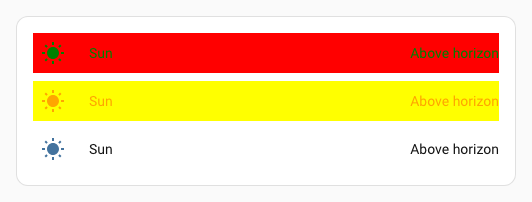
UIX themes can be leveraged with custom css variables, by declaring those high in the Frontend hierarchy, say uix-drawer, uix-view, or uix-root:
uix-drawer: |

    :host {
      {% set isDark = is_state('sun.sun','below_horizon') %}
      --darkslateblue-if-dark: {{ 'darkslateblue' if isDark else 'red' }};
      --slategrey-if-dark: {{ 'slategrey' if isDark else 'green' }};
      --yellow-if-not-dark: {{ 'yellow' if not isDark else 'pink' }};
      --orange-if-not-dark: {{ 'orange' if not isDark else 'purple' }};
    }
and use those custom css variables lower in the frontend hierarchy, say uix-card or uix-dialog, or even in a direct UIX card styling:
type: entities
entities:
  - entity: sun.sun
    uix:
      style: |
        hui-generic-entity-row {
          background: var(--darkslateblue-if-dark);
          color: var(--slategrey-if-dark);
          --state-icon-color: var(--slategrey-if-dark);
        }
  - entity: sun.sun
    uix:
      style: |
        hui-generic-entity-row {
          background: var(--yellow-if-not-dark);
          color: var(--orange-if-not-dark);
          --state-icon-color: var(--orange-if-not-dark);
        }
  - entity: sun.sun