 Search spark
The search spark queries a container element with a CSS selector, optionally filters the results by a text regex, and then applies class, attribute, and/or text mutations to every matching element. It also sets up a MutationObserver so that newly added elements (for example, calendar events after month navigation) are automatically processed without any additional configuration.
Basic usage
Add a search entry to forge.sparks:
type: custom:uix-forge
forge:
  mold: card
  sparks:
    - type: search
      for: hui-calendar-card $ ha-full-calendar $
      query: .fc-event-title
      text: "Meeting"
      actions:
        add_class:
          - highlight
element:
  type: calendar
  entities:
    - calendar.work
query is a CSS selector passed to querySelectorAll on the resolved container. text is a regex that is tested against the full text content of each matched element (including text inside child elements such as <a> or <span>). Only elements that pass the text filter receive the actions.
Configuration
| Key | Type | Required | Default | Description |
|---|---|---|---|---|
type |
string |
✅ | — | Must be search. |
for |
string |
element |
UIX selector for the container element to search within. Supports $ for shadow-root crossings (see DOM navigation). Default element refers to the root of the forged element. |
|
query |
string |
✅ | — | CSS selector passed to querySelectorAll on the resolved container. All matching elements receive the configured actions. |
text |
string |
— | Regular expression string. When provided, only elements whose full text content (including text inside child elements) matches the regex are processed. | |
actions |
object |
{} |
Mutations to apply to each matching element. See Actions below. |
Tip
Use the uix_forge_path() console helper to find the exact selector for for.
Actions
The actions object may contain any combination of the following keys. All keys are optional.
| Key | Type | Description |
|---|---|---|
add_class |
list[string] |
CSS class names to add to each matching element. |
remove_class |
list[string] |
CSS class names to remove from each matching element. |
add_attribute |
list[{attribute, value}] |
HTML attributes to set. Each entry must have an attribute name and a value string. |
remove_attribute |
list[string] |
HTML attribute names to remove from each matching element. |
replace_text |
string | {find, replace} |
Regex-based text replacement applied to every text node inside the element. A string is used as the regex pattern and the match is replaced with an empty string. An object with find and replace keys replaces each match with the replace value. |
prepend_text |
string |
Text to prepend to every text node inside the element. |
append_text |
string |
Text to append to every text node inside the element. |
Examples
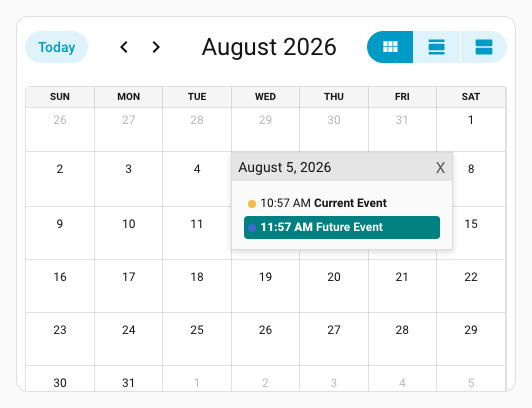
Add a CSS class to calendar events matching a regex
type: custom:uix-forge
forge:
  mold: card
  sparks:
    - type: search
      for: hui-calendar-card $ ha-full-calendar $
      query: .fc-event-title
      text: ^(Future|Timetravel)
      actions:
        add_class:
          - future-event
element:
  type: calendar
  entities:
    - calendar.calendar_1
    - calendar.calendar_2
  uix:
    style:
      ha-full-calendar $: |
        .future-event {
          background: teal;
          color: white;
          font-weight: 900;
        }
        .fc-daygrid-event:has(.future-event) {
          background-color: teal !important;
          border-color: blue !important;
          border-width: 2px;
        }
        .fc-event-time:has(+ .future-event) {
          background: teal;
          color: white;
          font-weight: 900;
        }
Remove an attribute from all matched elements
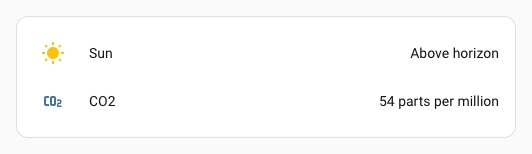
Strip title attributes from every link inside a markdown card so the browser's native tooltip does not appear:
type: custom:uix-forge
forge:
  mold: card
  sparks:
    - type: search
      for: >-
        hui-entities-card $ div:nth-child(2) hui-sensor-entity-row $ hui-generic-entity-row $
      query: .info
      text: Carbon dioxide
      actions:
        replace_text:
          find: Carbon dioxide
          replace: CO2
    - type: search
      for: hui-entities-card $ div:nth-child(2) hui-sensor-entity-row $
      query: hui-generic-entity-row
      text: ppm
      actions:
        replace_text:
          find: ppm
          replace: parts per million
element:
  type: entities
  entities:
    - sun.sun
    - sensor.carbon_dioxide
Prepend and append text
Add a prefix and suffix to first entities row info:
type: custom:uix-forge
forge:
  mold: card
  sparks:
    - type: search
      for: hui-entities-card $ div:nth-child(1) hui-sensor-entity-row $ hui-generic-entity-row $
      query: .info
      actions:
        prepend_text: "[ "
        append_text: " ]"
element:
  type: entities
  entities:
    - sensor.carbon_dioxide_battery

Match text inside child elements
The text filter matches the full text content of each element, including text wrapped inside child elements like <a>, <span>, etc.
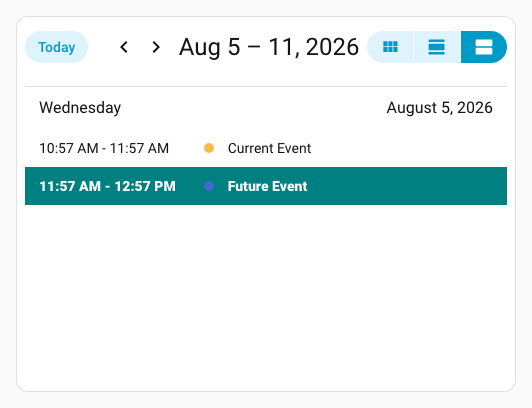
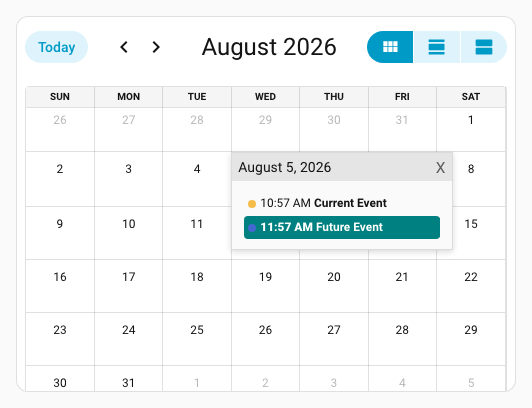
This example builds on from the earlier calendar example to include highlighting list events by adding the future-event class by querying .fc-list-event-title. Additional styling also added, using a selector that enables to select a preceding sibling of .future-event by using :has pseudo class with subsequent sibling combinator +.
type: custom:uix-forge
forge:
  mold: card
  sparks:
    - type: search
      for: hui-calendar-card $ ha-full-calendar $
      query: .fc-event-title
      text: ^(Future|Timetravel)
      actions:
        add_class:
          - future-event
    - type: search
      for: hui-calendar-card $ ha-full-calendar $
      query: .fc-list-event-title
      text: ^(Future|Timetravel) # Matches even though `Future` is in child <a> link
      actions:
        add_class:
          - future-event
element:
  type: calendar
  initial_view: listWeek
  entities:
    - calendar.calendar_1
    - calendar.calendar_2
  uix:
    style:
      ha-full-calendar $: |
        .future-event {
          background: teal;
          color: white;
          font-weight: 900;
        }
        .fc-daygrid-event:has(.future-event) {
          background-color: teal !important;
          border-color: blue !important;
        }
        .fc-event-time:has(+ .future-event) {
          background: teal;
          color: white;
          font-weight: 900;
        }
        .fc-list-event-graphic:has(+ .future-event) {
          background: teal;
          color: white;
          font-weight: 900;
          border-bottom-left-radius: 0;
          border-bottom-right-radius: 0;
        }
        .fc-list-event-time:has(~ .future-event) {
          background: teal;
          color: white;
          font-weight: 900;
          border-bottom-left-radius: 0;
          border-bottom-right-radius: 0;
        }
        .fc-list-event-title.future-event {
          border-bottom-left-radius: 0;
          border-bottom-right-radius: 0;
        }
Note
- All elements returned by
queryreceive the actions. Usetextto narrow the selection to elements whose text content matches a regex. - The spark watches the container with a
MutationObserverso dynamically added elements (e.g. after navigating a calendar month) are processed automatically.