Styling app and ingress panels
Home Assistant displays an individual app or ingress page in a
<ha-panel-app> element. Use the uix-app or uix-app-yaml theme key to
style that panel's open shadow root.
This is different from the installed-apps list at /config/apps/installed,
which belongs to the configuration panel and uses uix-config.
Example
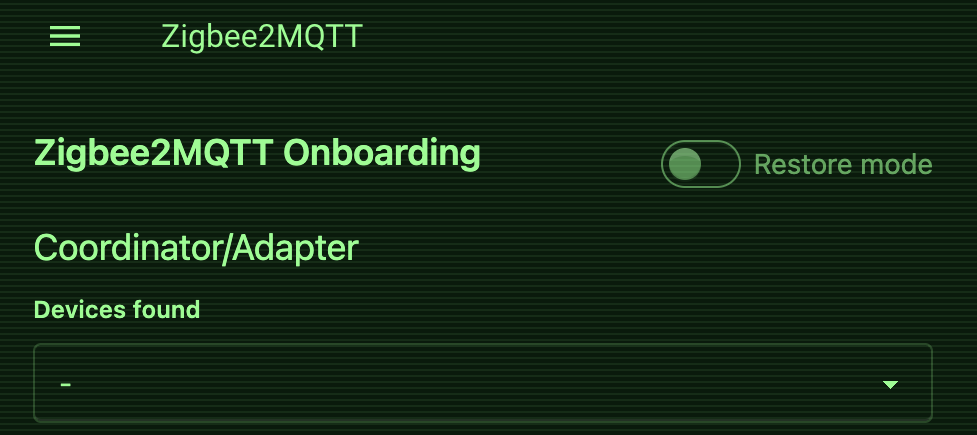
This example styles the Home Assistant panel header and places a non-interactive CRT overlay above the ingress iframe. It also styles the Zigbee2MQTT document inside that iframe.
Enable the experimental Style frame panels
option before using the uix-zigbee2mqtt block.
My theme:
  uix-theme: My theme

  uix-app: |
    :host {
      position: relative;
    }

    .header {
      background: #041b0b !important;
      color: #7cff88 !important;
    }

    :host::after {
      content: "";
      position: absolute;
      inset: 0;
      z-index: 1;
      pointer-events: none;
      background: repeating-linear-gradient(
        to bottom,
        rgb(124 255 136 / 8%) 0,
        rgb(124 255 136 / 8%) 1px,
        transparent 1px,
        transparent 3px
      );
    }

  # This is inside the Zigbee2MQTT iframe, not ha-panel-app.
  uix-zigbee2mqtt: |
    :root {
      --color-base-100: #041b0b;
      --color-base-content: #7cff88;
      --bg-color: #041b0b;
    }
Scope
Info
Same-origin app frame styling available in 3.4.0-beta.1
uix-app continues to style the Home Assistant panel chrome and can overlay its
iframe. UIX also installs its internal frame runtime in same-origin app frames.
Frame-content styling requires the experimental
Style frame panels option; host styling does
not.
For frame content, use uix-<app-slug> (or the -yaml form). UIX first
checks the complete Home Assistant app slug and then a repository-independent
slug with core_, local_, or an eight-character repository hash removed.
For example, uix-a0d7b954_nodered takes precedence over uix-nodered.
Tip
To best way to find the app-slug for uix-<app-slug> is to check your Browser developer console for the UIX loaded info which is generated by uixFrame.js. It will have form similar to:
💡 UIX 8.4.0 IS INSTALLED 💡 for 45df7312_zigbee2mqtt
The end part of this info is the app-slug e.g. 45df7312_zigbee2mqtt.
The frame runtime is an internal API shared with iframe custom panels. This does
not merge the user-facing concepts: uix-app always means the <ha-panel-app>
container, while uix-panel-custom always means the <ha-panel-custom>
container.
Styling
Some app panels such as the KNX Frontend use ha-card for display of information. If you wish for your uix-card(-yaml) theming to apply you will need to set the experimental feature Always patch ha-card.